Starting a business usually requires capital, but in 2025, thanks to technology and digital platforms, it’s possible to launch a digital marketing agency with zero investment. Whether you’re a student, freelancer, or someone in a career transition, this guide will show you exactly how to get started without spending a dime.
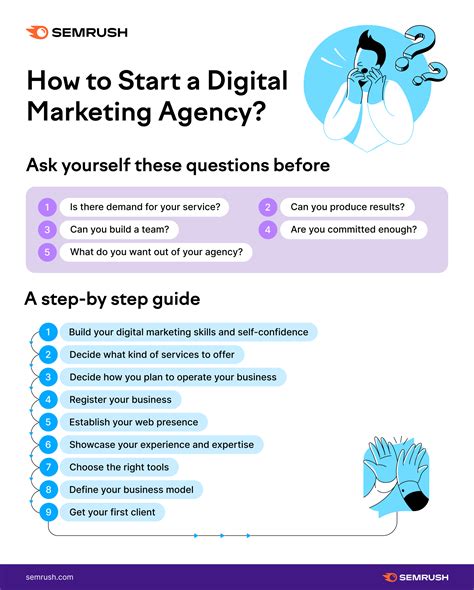
Step 1: Build Skill, Not Infrastructure
You don’t need a fancy office, business cards, or even a team to begin. All you need is skill in core areas like SEO, social media marketing, content writing, email marketing, or paid ads.
Use free courses on Coursera, HubSpot, Google Skillshop
Practice on your own LinkedIn or Instagram profile
Help a local business or a friend for free in exchange for testimonials
Step 2: Create a Personal Brand
Clients don’t hire agencies; they hire people they trust. Start posting value-driven content on LinkedIn, Twitter, or Instagram showcasing your expertise. Position yourself as a problem solver in marketing.
Step 3: Offer Services as a Freelancer
Start by offering services on freelance platforms like Fiverr, Upwork, or directly via cold outreach. Don’t build a website yet—use LinkedIn or your free portfolio on Notion or Canva.
SEO audits
Instagram content strategy
Email newsletter copywriting
Google/Facebook ad campaign setup
Step 4: Use Free Tools to Deliver Work
You don’t need premium tools to start delivering professional work. Use these free versions until you scale:
Canva – for content design
MailerLite – for email marketing
Google Analytics/Search Console – for website insights
Buffer or Later – for scheduling social media
Step 5: Convert Freelance Work into an “Agency”
Once you have 2–3 satisfied clients, shift the narrative. Instead of “I,” start using “we.” Collaborate with other freelancers on a per-project basis to handle more work while maintaining quality.
Create a simple landing page using Notion, Wix, or WordPress.com (free plan) showcasing your service packages and client results.
Step 6: Find Clients Without Spending Money
There are many free ways to attract clients without ads:
Answer marketing-related questions on Quora/Reddit
DM founders on LinkedIn with tailored value offers
Join Facebook groups for startups and entrepreneurs
Offer to fix one issue on their website/social presence
Bonus: What Services to Offer (Low Cost, High Demand)
You don’t need to be a jack-of-all-trades. Focus on high-demand services that require low overhead:
✔️ Convert one-off projects into monthly retainers
Conclusion
You don’t need a budget to start a digital marketing agency in 2025. You need initiative, learning, and hustle. Start solo, learn fast, and collaborate smart. Many seven-figure agencies today started on a laptop with nothing but a Canva login and a LinkedIn account. Yours could be next.
Want templates, outreach scripts, and toolkits? Subscribe and get our free agency starter pack!
In 2025, investors—especially beginners—are facing a tough choice: Should you invest in something cutting-edge like cryptocurrency or stick to a time-tested asset like real estate?
Cryptocurrency is known for explosive gains, decentralization, and digital innovation. On the other hand, real estate offers tangible assets, steady cash flow, and long-term security. Both have produced millionaires. Both come with risks. So how do you decide which is right for you?
This guide explores the pros, cons, risks, and returns of crypto and real estate in 2025 to help you make an informed investment decision.
Cryptocurrency in 2025: The New-Age InvestmentWhat is Cryptocurrency?
Cryptocurrency is a decentralized form of digital currency built on blockchain technology. Bitcoin, Ethereum, and thousands of altcoins now form a multi-trillion-dollar market.
Pros of Investing in Cryptocurrency
High potential returns
24/7 liquidity
Easy accessibility via apps and exchanges
Decentralized structure with no central authority
Can serve as a hedge against inflation
Cons of Investing in Cryptocurrency
Highly volatile markets
Security concerns including hacking and scams
Regulatory uncertainty
Emotional trading decisions based on hype
Real Estate in 2025: A Traditional Asset with Modern Appeal
Why Real Estate Still Matters
Real estate continues to be a cornerstone of wealth generation. From family homes to rental units and commercial buildings, it provides steady returns and physical assets.
Pros of Investing in Real Estate
Tangible, physical asset
Generates consistent rental income
Offers tax advantages
Can be leveraged through financing
Historically appreciates over time
Cons of Investing in Real Estate
High entry cost
Low liquidity
Maintenance and property management required
Market conditions vary by location
Vulnerable to interest rate changes
Side-by-Side Comparison: Crypto vs. Real Estate
Criteria
Cryptocurrency
Real Estate
Liquidity
High (24/7 trading)
Low (longer selling process)
Volatility
Very high
Low to moderate
Accessibility
Easy with mobile apps
Moderate (legal and financial setup)
Passive Income
Staking/yield farming
Rental income
Capital Required
Low (start with $10)
High (typically needs down payment)
Security
Prone to cyber risks
Insurable and tangible
Use Case Scenarios
26-Year-Old Freelancer
Goal: Build wealth using small monthly investments Choice: Invests $200/month in Bitcoin and Ethereum Why: High growth potential and easy entry
40-Year-Old Couple
Goal: Passive income and retirement planning Choice: Purchases a duplex and rents one unit Why: Steady cash flow, tax savings, and security
👨💼 35-Year-Old Entrepreneur
Goal: Diversification Choice: 60% real estate and 40% crypto Why: Balanced strategy to manage risk and growth
2025 Investment Trends
Crypto
Growing government regulation
Rise of tokenized assets like real estate NFTs
Increased DeFi opportunities
Launch of Central Bank Digital Currencies (CBDCs)
Real Estate
Fractional ownership via apps and platforms
Smart and automated property management
Green/eco-certified properties gaining popularity
REITs attracting passive investors
Which One Should You Choose?
It depends on your financial goals, risk tolerance, and investment horizon. Consider the table below for guidance:
Investor Goal
Recommended Investment
High liquidity and low capital
Cryptocurrency
Steady cash flow and tax savings
Real Estate
Long-term growth and stability
Real Estate
High-risk, high-reward potential
Cryptocurrency
Diversification
Both
Conclusion
In 2025, cryptocurrency and real estate both offer compelling reasons to invest. Crypto brings speed, accessibility, and high returns—but with greater volatility. Real estate offers long-term growth, stability, and passive income—but needs more capital and patience.
The smartest approach? Consider blending both into your portfolio. Let crypto bring fast gains and let real estate build steady wealth.
Customer relationships are the heart of any small business—and in 2025, managing those relationships requires more than spreadsheets and sticky notes. Enter CRM (Customer Relationship Management) tools, which help small businesses organize leads, automate follow-ups, close sales faster, and improve customer satisfaction.
But with dozens of CRMs available, which ones actually deliver value for small businesses without breaking the bank?
We’ve reviewed the top CRM tools for 2025 based on ease of use, pricing, features, and scalability. Whether you’re a solopreneur or a growing team, there’s something for everyone in this list.
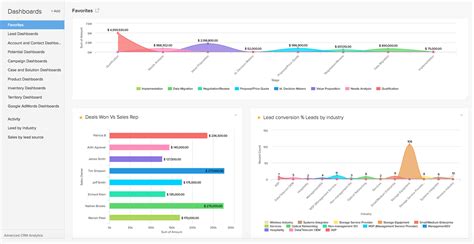
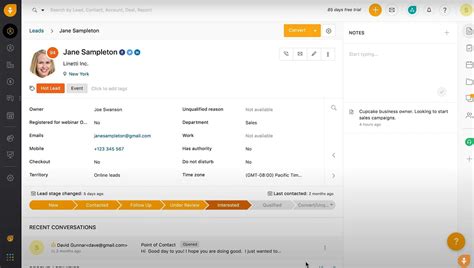
1. HubSpot CRM – Best Free CRM for Startups
HubSpot’s free plan makes it a go-to choice for startups. It includes contact management, email tracking, deal pipelines, forms, and integrations—all with a friendly UI.
Pricing: Free (paid upgrades available)
Best for: Freelancers, startups, consultants
2. Zoho CRM – Best All-in-One CRM for Small Teams
Zoho offers a powerful set of features like lead scoring, workflows, and analytics—all at very affordable pricing. Great for teams needing custom modules.
3. Salesforce Essentials – Best for Growing Startups
Salesforce is a beast, but the Essentials plan makes it small-business friendly. You get pipeline tracking, automation, and access to the Salesforce ecosystem.
Pricing: $25/month per user
Best for: Scaling companies that need flexibility
4. Pipedrive – Best CRM for Sales-Focused Teams
Pipedrive’s visual pipeline management and drag-and-drop simplicity make it a favorite for sales teams. It’s incredibly easy to set up and use.
Pricing: Starts at $14.90/month per user
Highlights: Sales automation, reporting, mobile app
5. Freshsales – Best AI-Powered CRM
Freshsales (from Freshworks) uses AI to score leads and automate tasks. It’s especially useful for businesses doing outreach via email, phone, or chat.
Pricing: Free for basic use, paid starts at $15/month
Great for: Inbound/outbound teams looking for automation
6. Monday Sales CRM – Best for Custom Workflows
Monday.com’s CRM system is highly visual and customizable. Perfect for teams that want to track more than just deals—projects, tasks, and marketing too.
Pricing: Starts at $10/month per user
Use case: Agencies, remote teams, project-focused companies
7. Insightly – Best CRM + Project Management Combo
Insightly offers a powerful blend of CRM and project tracking. It’s great for companies that want to manage sales and post-sale activities in one tool.
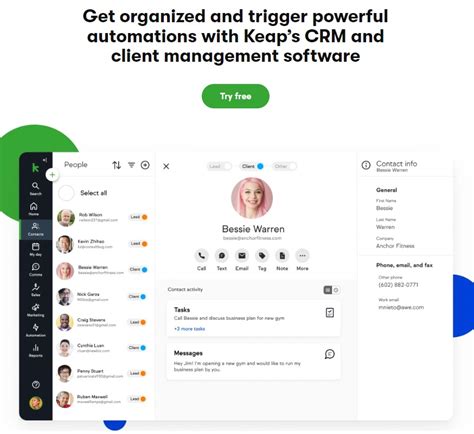
Keap is built for automating customer journeys—from lead capture to nurturing to conversion. It’s particularly useful for coaches, agencies, and marketers.
Pricing: Starts at $129/month
Note: High learning curve, but powerful once set up
💼 What to Look for in a CRM for Small Businesses
Before choosing a CRM, consider:
Ease of Use: Can your team use it without tons of training?
Automation: Does it reduce manual tasks like follow-ups or deal tracking?
Integrations: Will it work with your existing tools (e.g., Gmail, Zoom, Stripe)?
Mobile Access: Can your sales team use it on the go?
Scalability: Can the CRM grow with your business?
📊 Quick Comparison Table
CRM
Best For
Starting Price
Key Feature
HubSpot
Startups
Free
Ease of use, integrations
Zoho CRM
Small teams
$14/month
Custom modules, automation
Salesforce Essentials
Growing businesses
$25/month
Enterprise-level power
Pipedrive
Sales reps
$14.90/month
Visual pipeline
Conclusion
The right CRM can transform your small business by helping you stay organized, close more deals, and deliver better service. Whether you’re just getting started or ready to scale, there’s a CRM on this list that can meet your needs in 2025.
Test the free trials, compare features, and choose the one that fits your workflow—not the other way around.
When it comes to financial security, life insurance remains one of the most critical tools for protecting your loved ones. In 2025, with inflation, rising healthcare costs, and uncertain job markets, having the right life insurance policy can give peace of mind like nothing else.
But with so many options—term life, whole life, universal life—how do you know which policy is best for you?
In this guide, we break down the top life insurance plans available in the USA in 2025, compare their features, pros and cons, and help you decide which one fits your lifestyle and budget.
1. Haven Life – Best for Term Life Insurance
Haven Life, backed by MassMutual, offers simple, affordable term life insurance online—no medical exam for many applicants under 45.
Coverage: $250,000 to $3 million
Term Length: 10–30 years
Best For: Tech-savvy individuals and young families
2. Northwestern Mutual – Best for Whole Life Coverage
Northwestern Mutual offers strong whole life policies with dividends, guaranteed cash value growth, and high financial strength.
Pros: Long-standing reputation, top-rated customer service
Cons: Higher premiums compared to term policies
3. Ladder Life – Best for High Coverage Amounts
Ladder is ideal for people looking for flexible term life insurance with higher coverage limits (up to $8 million) and the ability to “ladder” coverage up or down.
Best For: Entrepreneurs, high-net-worth individuals
Application: 100% online with fast approvals
4. State Farm – Best for Personalized Service
With thousands of local agents, State Farm combines digital ease with personal service. They offer both term and permanent life insurance options.
Best For: People who prefer in-person consultations
Bonus: May include living benefits
5. Ethos Life – Best for No-Medical-Exam Policies
Ethos offers quick-issue term policies with zero medical exams in most cases. It’s all done online, making it perfect for busy people or those with minor health conditions.
Coverage: Up to $2 million
Best For: Applicants who want fast approval
6. New York Life – Best for Customizable Policies
New York Life has a century-long legacy and offers term, whole, universal, and variable life insurance. They’re known for custom plans and strong cash value growth.
Great For: Long-term planners and those looking for investment + insurance
7. USAA – Best for Military Families
USAA serves military members and their families with competitive rates, great customer support, and flexible options tailored for deployment and veteran life transitions.
Eligibility: Military personnel and family members
Coverage: Up to $10 million
8. Mutual of Omaha – Best for Final Expense Insurance
Looking for small coverage amounts to handle funeral expenses? Mutual of Omaha specializes in affordable, guaranteed-acceptance final expense policies.
No health questions required for basic plans
Perfect for seniors aged 50–85
How to Choose the Right Life Insurance Plan in 2025
Here are key things to consider before buying a policy:
Coverage Needs: How much money would your family need if you weren’t around?
Policy Type: Term is cheaper and simpler; Whole Life is for long-term planning
If you’ve been thinking about growing your money instead of just saving it, you’re not alone. With rising inflation, a fluctuating job market, and an increasing cost of living, investing is no longer a luxury—it’s a necessity.
For beginners, the idea of putting your hard-earned money into the stock market, mutual funds, or real estate can feel overwhelming. Where do you start? What’s safe? How much should you invest?
The good news? You don’t need to be a financial expert or have thousands of dollars to begin. In fact, 2025 has brought more beginner-friendly investment tools and platforms than ever. This guide breaks down 10 smart, low-risk strategies to kickstart your investment journey.
1. Set Clear Financial Goals
Before investing, define your “why.” Are you saving for a home? Planning early retirement? Creating long-term wealth?
Setting clear goals helps determine:
Your risk tolerance
Ideal investment timeline
Asset types to choose
Pro Tip: Break your goals into short-term (1–3 years), medium-term (3–7 years), and long-term (7+ years).
2. Build an Emergency Fund First
Before you invest, secure your foundation. An emergency fund protects you from life’s unexpected surprises—like medical bills or sudden job loss.
Recommended amount: 3 to 6 months of essential living expenses
Where to store it?
High-yield savings accounts
Liquid mutual funds
Money market accounts
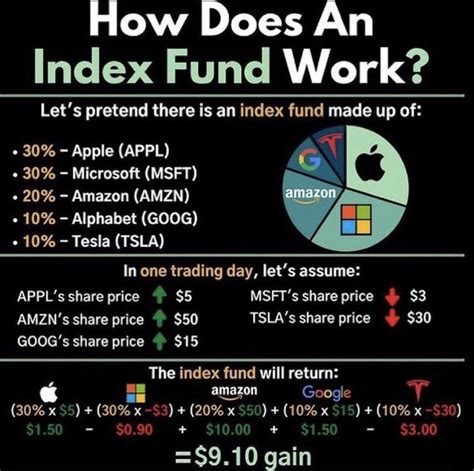
3. Start with Index Funds or ETFs
Don’t try to pick the next Amazon. Instead, start with index funds or exchange-traded funds (ETFs)—diverse bundles of stocks that track a specific index like the S&P 500 or Nifty 50.
Why they’re beginner-friendly:
Diversified = lower risk
Low fees
Consistent historical returns
Popular platforms: Vanguard, Zerodha, Groww, Robinhood
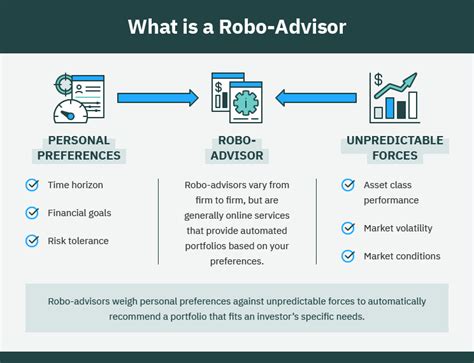
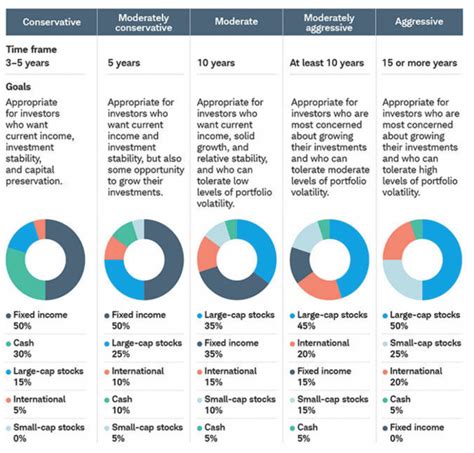
4. Use Robo-Advisors for Automated Investing
No time or expertise? Robo-advisors do the work for you.
You answer a few questions, and the platform builds and manages your portfolio using algorithms.
Benefits:
Start with low amounts
Automatic rebalancing
Lower fees than traditional advisors
Try: Betterment, INDmoney, Wealthfront
5. Take Advantage of Retirement Accounts
The earlier you invest in retirement, the bigger your gains thanks to compounding.
Tax-saving accounts by country:
USA: Roth IRA, 401(k)
India: PPF, NPS
UK: ISA
Canada: RRSP, TFSA
Even $50/month invested early can turn into six figures by retirement.
6. Invest in Fractional Shares or SIPs
Don’t have thousands to invest? No problem.
With fractional shares, you can invest in big companies like Apple or Tesla with just a few dollars. In India, use Systematic Investment Plans (SIPs) to invest monthly in mutual funds.
Why it works:
Builds consistency
Removes market timing stress
Great for tight budgets
7. Diversify Across Asset Classes
Don’t put all your eggs in one basket.
Diversifying means spreading your money across different types of investments, so your portfolio doesn’t sink if one area crashes.
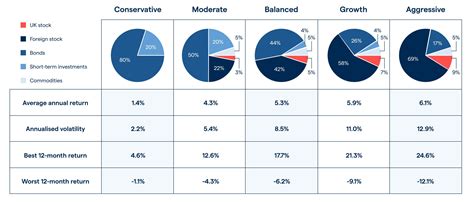
Mix of asset classes:
Stocks & ETFs
Bonds or debt funds
Real estate
Gold or commodities
Crypto (in moderation)
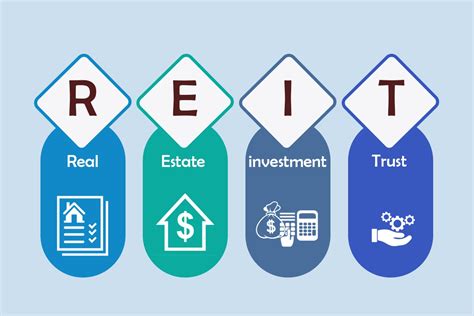
8. Explore REITs (Real Estate Investment Trusts)
Want real estate exposure without buying a property? Try REITs.
These are companies that own or finance income-producing properties. You earn returns from rental income and appreciation—without the headache of being a landlord.
Benefits:
Low capital needed
Regular dividend income
Traded like stocks (liquid)
9. Learn Before You Invest
Don’t invest blindly. Use 2025’s free tools and resources to build your confidence.
Learn from:
YouTube (Pranjal Kamra, Rachana Ranade)
Podcasts (BiggerPockets, The Money Guy Show)
Books (Rich Dad Poor Dad, The Psychology of Money)
🎯 The more you know, the fewer mistakes you’ll make.
10. Stay Consistent and Think Long-Term
Forget quick wins. Think long-term. The key to building wealth is consistency—not luck.
Follow this mindset:
Invest regularly (even in downturns)
Don’t panic-sell
Be patient. Let compounding work
⏳ “Time in the market beats timing the market.”
Bonus Tip: Avoid High Fees and Scams
High-fee advisors or too-good-to-be-true schemes can kill your returns.
Protect yourself:
Use trusted platforms
Stick with low-cost funds
Don’t trust unregulated tips or influencers promising guaranteed gains
Enterprise Resource Planning (ERP) software has evolved over the years to become an integral part of modern business operations. The history of ERP business software dates back to the 1960s and 1970s when businesses started to look for ways to integrate their various functions, such as finance, human resources, and manufacturing, into a single system. During this time, MRP (Material Requirements Planning) software was developed to help with production planning and inventory control.
As technology continued to advance, the need for a more comprehensive system that could handle all aspects of a company’s operations became apparent. In the 1980s, the concept of ERP software was born, with companies like SAP, Oracle, and Baan leading the way in developing integrated systems that could streamline processes and improve efficiency.
By the 1990s, ERP software had become more widely adopted by businesses of all sizes, thanks to advancements in technology and the increasing need for organizations to stay competitive in the global marketplace. ERP systems were no longer just reserved for large corporations; small and medium-sized businesses began to see the benefits of implementing these systems to help them manage their operations more effectively.
One of the key milestones in the history of ERP business software was the Y2K scare at the turn of the millennium. Many companies realized that their outdated systems were not equipped to handle the changing dynamics of the digital age, prompting a massive wave of ERP implementations to ensure compliance and future-proof their operations.
With the rise of cloud computing and mobile technology in the 2010s, ERP software has continued to evolve to meet the needs of a fast-paced and increasingly digital business environment. Today, ERP systems offer a range of features and functionalities, including real-time data insight, collaboration tools, and automation capabilities, to help businesses stay agile and competitive in the market.
In conclusion, the history of ERP business software is a testament to the evolution of technology and the ever-changing needs of businesses in a dynamic marketplace. From its humble beginnings in the 1960s to the cutting-edge systems of today, ERP software has played a crucial role in helping companies streamline their operations, improve productivity, and drive growth. As technology continues to advance, we can expect ERP software to become even more integrated, intelligent, and indispensable in the future.
Implementing ERP systems can bring a multitude of benefits to businesses, both large and small. From streamlining operations to improving decision-making processes, here are some of the key advantages of utilizing ERP software:
1. Improved Efficiency: ERP systems integrate various business functions and departments into a single platform, eliminating the need for manual data entry and reducing the risk of errors. This streamlined approach enhances productivity and efficiency across the organization, allowing employees to focus on more strategic tasks rather than time-consuming administrative activities.
2. Enhanced Visibility and Reporting: One of the major benefits of implementing ERP systems is the improved visibility it provides into all areas of the business. With real-time data updates and customizable reporting features, businesses can gain valuable insights into their operations, performance, and financial health. This enhanced visibility enables informed decision-making, as managers can quickly access key metrics and performance indicators to identify trends, track progress, and make data-driven decisions.
3. Simplified Compliance and Risk Management: ERP systems help businesses maintain compliance with industry regulations and standards by centralizing data and processes, making it easier to track and report on key compliance requirements. With built-in security features and controls, ERP software can also help organizations mitigate risks and protect sensitive data from breaches and cyber threats.
4. Cost Savings: By streamlining processes, reducing manual effort, and improving resource allocation, ERP systems can help businesses cut costs and increase profitability. From lower inventory carrying costs to reduced labor expenses, the efficiencies gained from implementing ERP software can have a significant impact on the bottom line. Additionally, ERP systems can help businesses identify areas of waste and inefficiency, enabling them to make informed decisions that drive cost savings and improve overall financial performance.
5. Scalability and Flexibility: As businesses grow and evolve, their operational needs change as well. ERP systems offer scalability and flexibility to adapt to the changing requirements of a growing organization. Whether adding new users, expanding into new markets, or integrating additional modules and functionalities, ERP software can easily accommodate business growth and expansion without disruption.
6. Competitive Advantage: In today’s fast-paced business environment, staying ahead of the competition is essential for long-term success. Implementing ERP systems can give businesses a competitive advantage by providing the tools and insights needed to make strategic decisions, optimize processes, and deliver superior customer experiences. By leveraging the power of ERP software, businesses can differentiate themselves in the market, drive innovation, and position themselves for sustainable growth and success.
Key Features and Functionality of ERP Software
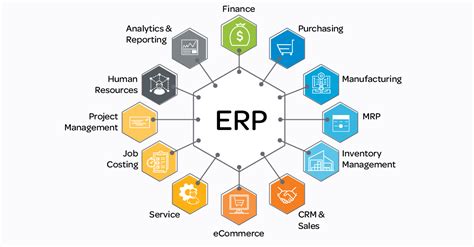
When it comes to ERP software, there are several key features and functionalities that make it a valuable tool for businesses of all sizes. ERP software is designed to streamline processes, increase efficiency, and improve overall business performance. Here are some of the most important features and functionalities of ERP software:
1. Integration of Financial Management: One of the primary functions of ERP software is to integrate financial management processes. This includes features such as general ledger, accounts payable, accounts receivable, budgeting, and financial reporting. By integrating these processes, ERP software allows businesses to easily track and manage their financials in one centralized system.
2. Inventory Management: Another key feature of ERP software is inventory management. With this functionality, businesses can track their inventory levels in real time, manage stock levels, set reorder points, and optimize inventory turnover. This helps businesses to avoid stockouts, reduce excess inventory, and improve overall inventory management efficiency.
3. Customer Relationship Management (CRM): In addition to financial management and inventory management, many ERP software solutions also include CRM functionality. This allows businesses to manage their customer relationships, track sales leads, manage marketing campaigns, and improve customer service. By integrating CRM with ERP software, businesses can gain a more comprehensive view of their customers and improve overall customer satisfaction.
4. Human Resources Management: ERP software also typically includes features for human resources management, such as employee records, payroll processing, benefits administration, and performance management. This helps businesses to track and manage their workforce effectively, streamline HR processes, and ensure compliance with labor laws and regulations.
5. Supply Chain Management: Supply chain management is another important functionality of ERP software. This includes features such as order management, supplier management, procurement, and logistics management. By integrating supply chain management with other business processes, ERP software helps businesses to optimize their supply chain operations, reduce costs, and improve overall efficiency.
6. Reporting and Analytics: ERP software also provides robust reporting and analytics capabilities. Businesses can generate customized reports, dashboards, and KPIs to track key performance metrics and make data-driven decisions. This allows businesses to gain insight into their operations, identify trends, and make informed business decisions.
7. Scalability and Customization: One of the key advantages of ERP software is its scalability and customization capabilities. Businesses can easily scale their ERP system as they grow, adding new features and functionalities as needed. Additionally, ERP software can be customized to meet the specific needs of a business, ensuring that it aligns with their unique processes and requirements.
Overall, ERP software offers a wide range of key features and functionalities that can help businesses streamline their operations, improve efficiency, and drive growth. By utilizing ERP software, businesses can gain a competitive edge in today’s fast-paced business environment.
Common ERP Implementation Challenges
Implementing an ERP system can be a complex and challenging process for any business. It requires careful planning, coordination, and execution to ensure a successful outcome. Here are some common challenges that organizations may face when implementing ERP software:
1. Resistance to Change: One of the biggest challenges in implementing ERP software is getting employees to buy into the new system. Many employees may resist change because they are comfortable with the existing processes and tools. To overcome this challenge, it is essential to provide adequate training and support to help employees understand the benefits of the new system and how it will improve their day-to-day tasks.
2. Customization Requirements: Another common challenge is the need for customization to fit the ERP software to the unique requirements of the organization. While most ERP systems offer a range of features and functionality out of the box, there may still be a need to tailor the system to specific business processes. This customization can be time-consuming and costly, so it is important to carefully assess the extent of customization needed before implementation.
3. Data Migration: Moving data from existing systems to the new ERP software can be a complex and challenging process. Data quality issues, incompatible formats, and data mapping errors are all common challenges that organizations may face during data migration. It is essential to thoroughly assess the data migration requirements and develop a detailed plan to ensure a smooth transition of data to the new system.
4. Integration with Existing Systems: One of the most significant challenges in ERP implementation is integrating the new system with existing business systems and processes. Many organizations have a variety of systems in place, such as CRM, HR, and financial systems, that need to work seamlessly with the new ERP software. Ensuring that these systems can communicate effectively and share data is essential for the success of the ERP implementation. This may require extensive customization and development work to create integration points and interfaces between systems.
Overall, implementing ERP software can be a complex and challenging process for any organization. By addressing these common challenges and planning carefully, businesses can increase the likelihood of a successful ERP implementation that delivers measurable benefits to the organization.
Selecting the Right ERP Solution for Your Business
When it comes to choosing the right ERP solution for your business, there are several key factors to consider. Here are some important steps to help you make the best decision for your company:
1. Define Your Business Needs: Before you start looking at different ERP solutions, it’s important to first identify your business needs. What are your business goals? What specific problems are you trying to solve with an ERP system? Understanding your unique requirements will help you narrow down your options and select a solution that aligns with your objectives.
2. Conduct a Thorough Research: Once you have a clear understanding of your business needs, it’s time to start researching ERP solutions. Look at different vendors and compare their features, pricing, and customer reviews. You may also want to consider industry-specific solutions that are tailored to your type of business.
3. Consider Scalability: It’s essential to choose an ERP solution that can grow with your business. Make sure the system you select can handle increased data and user requirements as your company expands. Scalability is crucial for long-term success, so don’t overlook this important factor.
4. Evaluate Integration Capabilities: Your ERP system should be able to seamlessly integrate with your existing software applications and systems. Make sure the solution you choose has the ability to connect with other tools and platforms your business relies on for day-to-day operations. This will help streamline processes and improve overall efficiency.
5. Get User Feedback: Before making a final decision, involve key stakeholders and end-users in the selection process. Get feedback from different departments within your organization to understand their needs and concerns. This will help ensure that the ERP solution you choose meets the requirements of all team members and is user-friendly for everyone involved.
By following these steps and carefully evaluating your options, you can select the right ERP solution for your business that will help streamline processes, increase efficiency, and drive growth. Don’t rush the decision-making process and take the time to find a solution that aligns with your business objectives and budget.
Welcome, curious reader, to a journey into the world of multiview ERP systems and the myriad of benefits they offer to businesses of all sizes. In today’s dynamic business environment, staying ahead of the competition requires innovative solutions that streamline operations, enhance efficiency, and drive growth. Multiview ERP systems are designed to do just that, by providing a comprehensive view of all aspects of a business in one platform. From finance and inventory management to customer relationship management and supply chain optimization, these integrated systems offer a holistic approach to running a successful enterprise. Let’s dive deep into the advantages of multiview ERP systems and discover how they can revolutionize your business operations.
Overview of Multiview ERP
Multiview ERP is a comprehensive enterprise resource planning software that is designed to help businesses manage their financial operations efficiently. It offers a wide range of features and tools to streamline processes, improve decision-making, and increase productivity. Multiview ERP is known for its user-friendly interface and customizable options, making it a popular choice among businesses of all sizes.
One of the key features of Multiview ERP is its robust financial management capabilities. The software allows users to track and monitor all aspects of their financial transactions, from accounts payable and receivable to general ledger and payroll. With real-time reporting and analytics, businesses can gain valuable insights into their financial health and make informed decisions quickly.
Another important aspect of Multiview ERP is its integration capabilities. The software can easily connect with other business systems, such as customer relationship management (CRM) and human resources management (HRM) software, to create a seamless and unified platform for all business operations. This integration reduces manual data entry and improves data accuracy, leading to increased efficiency and reduced costs.
In addition to its financial and integration features, Multiview ERP also offers advanced security measures to protect sensitive data. With customizable user permissions and encryption technologies, businesses can rest assured that their information is safe from unauthorized access. The software also provides regular updates and maintenance to ensure that it remains compliant with industry regulations and standards.
Furthermore, Multiview ERP provides excellent customer support and training services to help businesses get the most out of the software. From implementation and onboarding to ongoing technical assistance, the dedicated support team is always available to address any issues or questions that may arise. This, combined with the intuitive interface and user-friendly design, makes Multiview ERP a top choice for companies looking to streamline their financial operations.
Key Features and Functionality of Multiview ERP
Multiview ERP is a comprehensive software solution that offers a wide range of key features and functionalities to streamline business processes and enhance productivity. Some of the key features of Multiview ERP include:
1. Financial Management: Multiview ERP offers robust financial management capabilities, including general ledger, accounts payable, accounts receivable, and cash management. The system allows users to track financial transactions, create financial reports, and manage budgets with ease. With Multiview ERP, organizations can gain better insights into their financial performance and make informed decisions.
2. Inventory Management: One of the standout features of Multiview ERP is its advanced inventory management functionality. The system allows users to track inventory levels, manage stock movements, and streamline order fulfillment processes. With Multiview ERP, organizations can optimize their inventory management processes, reduce stockouts, and improve overall efficiency. Additionally, the system offers real-time visibility into inventory levels, helping organizations make informed decisions about stock replenishment and inventory optimization.
3. Procurement and Purchasing: Multiview ERP includes powerful procurement and purchasing tools that help organizations streamline their purchasing processes and reduce costs. The system allows users to create purchase orders, track supplier performance, and manage vendor relationships effectively. With Multiview ERP, organizations can automate procurement workflows, improve purchasing efficiency, and ensure compliance with procurement policies and regulations.
4. Sales and Customer Relationship Management: Multiview ERP offers robust sales and customer relationship management capabilities, allowing organizations to manage customer interactions, track sales activities, and improve customer satisfaction. The system enables users to create sales quotes, manage sales orders, and track customer accounts effectively. With Multiview ERP, organizations can streamline their sales processes, enhance customer relationships, and drive revenue growth.
5. Reporting and Analytics: Multiview ERP provides powerful reporting and analytics tools that enable organizations to gain actionable insights into their business performance. The system offers customizable reports, dashboards, and key performance indicators, allowing users to track key metrics, analyze trends, and make data-driven decisions. With Multiview ERP, organizations can easily monitor their performance, identify areas for improvement, and drive business growth.
Overall, Multiview ERP is a comprehensive software solution that offers a wide range of key features and functionalities to help organizations streamline their business processes, improve efficiency, and drive growth. With its advanced capabilities in financial management, inventory management, procurement, sales, and reporting, Multiview ERP is a valuable tool for organizations looking to optimize their operations and achieve their business goals.
Implementation Process of Multiview ERP
Implementing Multiview ERP can be a smooth process if done correctly. Here are the steps involved in the implementation process:
1. Planning and Preparation: The first step in implementing Multiview ERP is to plan and prepare for the process. This includes identifying the goals and objectives of the implementation, determining the scope of the project, and creating a timeline for the implementation process. It is important to involve key stakeholders in the planning process to ensure that everyone is on the same page.
2. System Design: Once the planning is done, the next step is to design the system according to the specific needs and requirements of the organization. This involves customizing the software to fit the business processes and workflows of the company. Multiview ERP offers a high level of customization, allowing organizations to tailor the system to their unique requirements.
3. Data Migration: One of the most critical aspects of the implementation process is data migration. This involves transferring data from the existing systems to the new Multiview ERP system. Data migration can be a complex process, as it requires careful planning and execution to ensure that all data is transferred accurately and securely. Organizations must clean and organize their data before migration to prevent any errors or data loss during the process. Multiview ERP provides tools and resources to help with data migration, making the process smoother and more efficient.
4. Training and Testing: Once the system is designed and data migration is complete, the next step is to train users on how to use the new Multiview ERP system. Training is crucial to ensure that employees can effectively navigate the system and perform their tasks efficiently. Organizations can provide on-site training, online tutorials, and user manuals to support employees during the transition. Additionally, testing the system before full implementation is essential to identify any issues or bugs that need to be addressed before going live.
5. Go-Live and Support: The final step in the implementation process is to go live with the new Multiview ERP system. This involves transitioning from the old systems to the new system and ensuring that everything is working smoothly. Organizations must provide ongoing support and assistance to users as they adjust to the new system. Multiview ERP offers support services to help organizations troubleshoot issues, optimize system performance, and maximize the benefits of the software.
Overall, the implementation process of Multiview ERP requires careful planning, collaboration, and execution to ensure a successful transition. By following these steps and investing in the right resources, organizations can leverage the full potential of Multiview ERP to streamline operations, improve efficiency, and drive growth.
Benefits of Using Multiview ERP
When it comes to managing your business operations effectively, implementing an Enterprise Resource Planning (ERP) system like Multiview ERP can offer a wide range of benefits. From streamlining processes to improving decision-making, here are some key advantages of using Multiview ERP:
1. Improved efficiency:
One of the primary benefits of using Multiview ERP is the improved efficiency it brings to your business operations. By centralizing all your data and processes in one system, Multiview ERP eliminates the need for manual data entry and reduces the risk of errors. This allows your employees to focus on more strategic tasks and ensures that your business runs smoothly and efficiently.
With Multiview ERP, you have access to real-time data and insights that can help you make better-informed decisions for your business. Whether it’s analyzing financial performance, monitoring inventory levels, or forecasting future sales, Multiview ERP provides you with the tools you need to make data-driven decisions that can drive your business forward.
3. Increased visibility:
Another key benefit of using Multiview ERP is the increased visibility it provides into all aspects of your business. With a central dashboard that gives you a comprehensive view of your operations, you can easily track performance metrics, monitor key performance indicators, and identify areas for improvement. This enhanced visibility can help you identify trends, spot opportunities, and address issues before they become major problems.
4. Enhanced collaboration:
In addition to improving efficiency and decision-making, Multiview ERP also promotes collaboration within your organization. By providing a centralized platform for employees to access and share information, Multiview ERP fosters communication and coordination across departments. This can lead to better teamwork, faster problem-solving, and ultimately, greater overall productivity.
Furthermore, Multiview ERP can also facilitate collaboration with external partners, such as suppliers, customers, and third-party vendors. By integrating your business processes with those of your partners, you can streamline workflows, reduce lead times, and enhance the overall efficiency of your supply chain.
In conclusion, using Multiview ERP can bring a multitude of benefits to your business, from improved efficiency and decision-making to increased visibility and enhanced collaboration. By leveraging the power of Multiview ERP, you can take your business operations to the next level and drive growth and success for your organization.
Comparison of Multiview ERP with Other ERP Systems
When it comes to comparing Multiview ERP with other ERP systems in the market, it is essential to consider the unique features and benefits that set Multiview apart from its competitors. One of the key strengths of Multiview ERP is its user-friendly interface and customization options. Unlike some ERP systems that can be complex and difficult to navigate, Multiview offers an intuitive and easy-to-use interface that allows users to quickly access the information they need.
Another advantage of Multiview ERP is its ability to integrate with other software applications seamlessly. This means that users can easily sync data between Multiview and other systems, such as CRM software or inventory management tools, without encountering any compatibility issues.
Furthermore, Multiview ERP offers robust reporting and analytics capabilities that allow for real-time insights into business operations. Users can generate custom reports, track key performance indicators, and analyze data trends to make informed decisions about their business.
One area where Multiview ERP stands out is its superior customer service and support. The company is known for providing excellent customer support to its clients, with dedicated account managers and technical experts available to assist with any issues or questions that may arise.
Lastly, Multiview ERP is highly scalable and customizable, making it suitable for businesses of all sizes and industries. Whether you are a small start-up or a large enterprise, Multiview can be tailored to meet your specific needs and grow with your business.
Overall, when comparing Multiview ERP with other ERP systems, it is clear that Multiview offers a unique combination of user-friendly features, seamless integration capabilities, powerful reporting tools, top-notch customer service, and scalability. These factors make Multiview ERP an excellent choice for businesses looking to streamline their operations and improve efficiency.
Hey there, hospital administrators! Are you tired of juggling multiple software systems and struggling to keep track of all the operations in your healthcare facility? Streamlining hospital operations with ERP software might just be the solution you’re looking for. From managing patient records to tracking inventory and scheduling appointments, ERP software can help simplify and centralize all your hospital’s essential functions. Let’s explore how implementing ERP software can revolutionize the way your hospital operates!
Implementation of ERP Software in Hospitals
Implementing ERP software in hospitals can be a game changer for improving efficiency and quality of patient care. However, the process of implementing ERP software in a hospital setting can be complex and challenging. It requires careful planning, coordination, and involvement of key stakeholders to ensure a successful transition.
The first step in implementing ERP software in a hospital is to assess the current systems and processes in place. This involves identifying existing inefficiencies, bottlenecks, and areas for improvement. Hospital administrators need to conduct a thorough analysis of their current operations to determine the specific needs and requirements for the ERP system.
Once the hospital has identified its requirements, the next step is to select the right ERP software vendor. It is crucial to choose a vendor that understands the unique needs of the healthcare industry and has experience in implementing ERP systems in hospital settings. The vendor should also provide adequate training and support to ensure a smooth implementation process.
After selecting a vendor, the hospital needs to create a detailed implementation plan. This plan should outline the timeline, budget, resources, and responsibilities for each phase of the implementation process. It is important to involve key stakeholders, such as department heads, IT staff, and frontline healthcare workers, in the planning process to ensure buy-in and cooperation.
Training is another critical component of implementing ERP software in hospitals. Hospital staff need to be properly trained on how to use the new system effectively. This training should be ongoing and tailored to the specific roles and responsibilities of each employee. In addition to formal training sessions, hospitals should provide access to user manuals, online resources, and technical support to help staff navigate the system.
During the implementation process, hospitals may encounter unexpected challenges and obstacles. It is important to have a dedicated project team in place to address any issues that arise and make necessary adjustments to the implementation plan. Regular communication and feedback loops are essential to ensure that the implementation stays on track and meets the hospital’s goals and objectives.
After the ERP software has been fully implemented, hospitals should continue to monitor and evaluate its performance. Regular audits and assessments can help identify areas for improvement and optimization. Hospitals should also seek feedback from staff and patients to gauge their satisfaction with the new system and make any necessary adjustments.
In conclusion, implementing ERP software in hospitals can streamline operations, improve patient care, and enhance overall efficiency. By carefully planning, selecting the right vendor, training staff, and monitoring performance, hospitals can successfully transition to a more integrated and effective system.
Key Features and Benefits of ERP for Hospital Management
Implementing an ERP software system in a hospital setting can bring numerous benefits and features that can streamline operations, improve efficiency, and enhance patient care. Let’s take a closer look at some of the key features and benefits of ERP for hospital management.
1. Streamlined Operations: One of the primary benefits of ERP software for hospitals is its ability to streamline operations. With an integrated system that connects different departments, healthcare providers can easily access important information and communicate effectively. This leads to faster decision-making, reduced errors, and improved overall efficiency.
2. Enhanced Data Management: ERP systems for hospitals offer robust data management capabilities, allowing healthcare providers to store, track, and analyze vast amounts of patient data. This centralized approach to data management ensures that all information is accurate, up-to-date, and easily accessible. With real-time insights and analytics, hospitals can make informed decisions and improve patient outcomes.
3. Improved Patient Care: By streamlining operations and enhancing data management, ERP software can ultimately improve patient care. Healthcare providers can access patient records quickly, coordinate care more effectively, and ensure that the right treatment is administered at the right time. This results in better outcomes for patients and a higher level of satisfaction.
4. Cost Savings: Implementing an ERP system in a hospital can lead to significant cost savings in the long run. By automating processes, reducing manual errors, and optimizing resource allocation, hospitals can operate more efficiently and minimize unnecessary expenses. This not only saves money but also ensures that resources are used effectively to benefit patient care.
5. Regulatory Compliance: ERPs for hospital management often come equipped with features that help ensure regulatory compliance. With built-in tools for tracking and reporting on compliance standards, hospitals can easily demonstrate adherence to laws and regulations. This reduces the risk of penalties and legal issues, providing peace of mind for healthcare providers and patients alike.
6. Scalability and Flexibility: Another key feature of ERP software for hospitals is its scalability and flexibility. As healthcare organizations grow and evolve, ERP systems can adapt to changing needs and requirements. This allows hospitals to expand their operations, add new services, or accommodate increased patient volumes without disrupting existing workflows.
Overall, ERP software offers a wide range of features and benefits for hospital management. From streamlining operations and enhancing data management to improving patient care and ensuring regulatory compliance, implementing an ERP system can revolutionize the way healthcare providers deliver services. By leveraging the power of technology, hospitals can operate more efficiently, reduce costs, and ultimately enhance the quality of care for their patients.
Integrating ERP with Electronic Health Records (EHR) Systems
ERP software for hospitals plays a crucial role in streamlining operations, managing resources efficiently, and ultimately improving patient care. When it comes to integrating ERP with Electronic Health Records (EHR) systems, the benefits are even greater. EHR systems hold important patient data, clinical notes, lab results, prescriptions, and more. By seamlessly integrating ERP with EHR systems, hospitals can improve data accuracy, enhance communication between departments, and increase overall efficiency.
One of the key advantages of integrating ERP with EHR systems is the ability to centralize and automate data management processes. With both systems working together, hospital staff can access and update patient information in real-time, reducing the risk of errors and improving the quality of care. For example, when a patient’s demographic information is updated in the ERP system, it will automatically sync with the EHR system, ensuring that all departments have access to the most current information.
Another benefit of integrating ERP with EHR systems is improved efficiency in billing and revenue cycle management. By integrating these two systems, hospitals can streamline the process of capturing charges, submitting claims, and processing payments. This not only speeds up the billing cycle but also reduces the risk of billing errors and delays. Additionally, hospitals can better track and analyze financial data, helping them make informed decisions and optimize revenue generation.
Furthermore, the integration of ERP with EHR systems enables hospitals to enhance patient care coordination. With both systems sharing data seamlessly, healthcare providers can collaborate more effectively, resulting in improved communication and better patient outcomes. For example, a physician can quickly access a patient’s medical history, lab results, and treatment plans through the EHR system, allowing them to make informed decisions and provide personalized care.
Additionally, the integration of ERP with EHR systems can help hospitals comply with regulatory requirements and industry standards. By consolidating data management processes and ensuring data integrity, hospitals can easily generate reports, track key performance indicators, and demonstrate compliance with regulations such as HIPAA. This not only reduces the risk of fines and penalties but also builds trust with patients and ensures the security and privacy of their data.
In conclusion, integrating ERP with Electronic Health Records (EHR) systems is essential for modern hospitals looking to enhance operational efficiency, improve patient care, and ensure regulatory compliance. By centralizing data management, streamlining billing processes, enhancing care coordination, and maintaining data integrity, hospitals can achieve significant benefits and deliver better healthcare services to their patients.
Choosing the Right ERP Software for Hospital Operations
When it comes to implementing ERP software for hospital operations, it is crucial to choose the right solution that meets the specific needs and requirements of the healthcare facility. The selection process can be overwhelming, considering the variety of options available in the market. However, by following some key considerations, hospitals can narrow down their choices and find the best ERP software for their operations.
One of the most important factors to consider when choosing ERP software for hospital operations is the scalability of the solution. Hospitals are dynamic environments that are constantly growing and evolving. Therefore, it is essential to select an ERP system that can adapt to the changing needs of the hospital. Scalability ensures that the software can accommodate an increase in patient volume, expansion of services, and other operational changes without compromising performance.
Another critical factor to consider is the integration capabilities of the ERP software. Hospital operations involve a wide range of departments, from patient care to billing and inventory management. An integrated ERP system allows for seamless communication and data sharing between different departments, improving efficiency and reducing errors. Hospitals should look for a solution that can easily integrate with existing systems and third-party applications to streamline workflows and enhance collaboration across departments.
Usability is also a key consideration when selecting ERP software for hospital operations. The system should be user-friendly and intuitive, allowing staff members to quickly learn and navigate the software with minimal training. A user-friendly interface enhances productivity and reduces the likelihood of errors, ultimately improving patient care and satisfaction. Hospitals should also consider the level of support and training provided by the ERP vendor to ensure a smooth implementation process and ongoing success.
Furthermore, hospitals must evaluate the security features of the ERP software to protect patient data and ensure compliance with healthcare regulations. Data breaches and cybersecurity threats are significant concerns for healthcare organizations, making security a top priority when selecting an ERP system. Hospitals should look for software that offers robust security measures, such as encryption, access controls, and regular security updates, to safeguard sensitive information and maintain patient confidentiality.
In conclusion, choosing the right ERP software for hospital operations is a critical decision that can impact the efficiency, quality of care, and overall success of the healthcare facility. By considering factors such as scalability, integration capabilities, usability, and security, hospitals can select a solution that meets their specific needs and helps them achieve their operational goals. With the right ERP software in place, hospitals can streamline processes, improve communication, and deliver high-quality care to patients.
Overcoming Challenges in Implementing ERP in a Hospital Setting
Implementing ERP software in a hospital setting comes with its own set of challenges. Hospitals are complex organizations with various departments and functions that need to work together seamlessly. Here are some common challenges hospitals face when implementing ERP software and how they can overcome them:
1. Resistance to Change: One of the biggest challenges hospitals face when implementing ERP software is resistance to change from staff. Employees may be comfortable with their existing processes and reluctant to adopt new technology. To overcome this challenge, hospitals should involve staff in the decision-making process and provide training and support to help them transition to the new system.
2. Integration of Systems: Hospitals typically have multiple systems in place for different departments, such as billing, scheduling, and patient records. Integrating these systems with an ERP software can be a complex process. Hospitals can overcome this challenge by working with a vendor that specializes in healthcare ERP solutions and has experience with system integration.
3. Data Security: Hospitals deal with sensitive patient information that needs to be protected at all costs. Implementing ERP software can pose security risks if not implemented properly. Hospitals can address this challenge by conducting thorough security assessments, implementing encryption protocols, and providing staff with security training.
4. Customization Needs: Every hospital has its own unique processes and workflows that may not fit out-of-the-box ERP solutions. Customizing the software to meet the hospital’s specific needs can be time-consuming and costly. Hospitals should work closely with their ERP vendor to identify customization needs early on and create a plan for implementation.
5. Cost of Implementation: One of the most significant challenges hospitals face when implementing ERP software is the cost. ERP systems can be expensive to purchase, customize, and maintain. Additionally, hospitals may face unforeseen costs during the implementation process. To overcome this challenge, hospitals should conduct a thorough cost-benefit analysis, create a detailed budget, and consider cost-saving measures such as cloud-based ERP solutions or financing options.
In conclusion, implementing ERP software in a hospital setting can be a complex and challenging process. By addressing common challenges such as resistance to change, system integration, data security, customization needs, and cost considerations, hospitals can successfully implement an ERP system that improves efficiency, productivity, and patient care.
Welcome to the world of ERP software platforms, where businesses can streamline their operations and maximize efficiency like never before. These powerful tools not only help manage various aspects of a company’s operations, but also provide valuable insights and data to drive informed decision-making. From inventory management to financial reporting, ERP software platforms are revolutionizing the way businesses operate in today’s fast-paced world. Let’s delve into the amazing capabilities of these platforms and explore how they can transform your business operations.
Understanding ERP Software Platforms
ERP software platforms are comprehensive business management tools that integrate all facets of a company’s operations into a single system. These platforms help streamline processes, improve efficiency, and provide real-time insights for better decision-making. With ERP software, companies can manage everything from accounting and human resources to inventory and customer relationship management in one centralized location.
One of the key features of ERP software platforms is their ability to automate repetitive tasks, reducing the need for manual data entry and freeing up time for employees to focus on more strategic initiatives. By automating processes such as invoicing, inventory management, and payroll, companies can reduce errors and improve overall accuracy in their operations.
Furthermore, ERP software platforms offer businesses a 360-degree view of their operations, allowing them to track performance, analyze data, and identify trends in real time. This visibility enables businesses to make informed decisions based on accurate information, leading to improved efficiency and productivity.
Another advantage of ERP software platforms is their scalability. As companies grow and evolve, their needs may change, requiring additional features or functionalities. ERP software platforms are designed to be flexible and customizable, allowing businesses to adapt and expand their systems as needed without incurring significant costs.
Additionally, ERP software platforms enhance collaboration and communication within an organization. By providing a centralized platform for employees to access information and collaborate on projects, ERP software fosters a culture of teamwork and transparency that can lead to increased productivity and morale.
In conclusion, ERP software platforms are powerful tools that can transform the way businesses operate. By centralizing data, automating processes, and providing real-time insights, ERP software platforms enable companies to improve efficiency, make better decisions, and ultimately drive growth and success. Embracing an ERP software platform is not just a trend, but a strategic imperative for businesses looking to stay competitive in today’s fast-paced, digital world.
Key Features of ERP Software Platforms
ERP software platforms offer a wide range of key features that help businesses streamline their operations and enhance efficiency. One of the most important features of an ERP software platform is centralized data management. This feature allows businesses to store all of their important data in one place, making it easily accessible to authorized users. With centralized data management, employees can quickly find the information they need without having to search through multiple systems or databases.
Another key feature of ERP software platforms is real-time reporting and analytics. These platforms provide businesses with up-to-date information on their operations, finances, and other key metrics. Real-time reporting allows business owners and managers to make informed decisions quickly, based on the most current data available. This feature is crucial for businesses looking to stay ahead of the competition and adapt to changing market conditions.
Additionally, ERP software platforms often include features for automating routine tasks and processes. Automation can help businesses save time and money by reducing the need for manual data entry and processing. By automating tasks such as invoicing, inventory management, and order processing, businesses can increase efficiency and productivity across their organization.
Collaboration tools are another important feature of ERP software platforms. These tools allow employees to communicate, share information, and work together on projects more effectively. Collaboration tools can include features such as instant messaging, document sharing, and project management tools. By incorporating these tools into their ERP software platform, businesses can improve communication, reduce errors, and increase productivity.
Finally, ERP software platforms often offer integration with other business software applications. This integration allows businesses to connect their ERP system with other tools they use, such as customer relationship management (CRM) software, e-commerce platforms, and accounting software. By integrating their ERP platform with other systems, businesses can streamline their operations, reduce data silos, and improve overall efficiency.
Implementing an ERP software platform offers a wide range of benefits for businesses of all sizes. From streamlining processes to improving decision-making capabilities, the advantages of utilizing an ERP system are numerous. Below are some of the key benefits of implementing an ERP software platform:
1. Increased Efficiency and Productivity
One of the main benefits of using an ERP software platform is the increase in efficiency and productivity it can provide. By centralizing all business processes and data in one system, employees are able to access information more quickly and easily. This streamlines operations and reduces the time spent on manual tasks, ultimately leading to increased productivity across the organization.
2. Improved Decision-Making
With an ERP software platform in place, decision-makers have access to real-time data and insights that can help them make informed decisions. By providing accurate and up-to-date information on various aspects of the business, such as sales, inventory, and financials, ERP systems enable businesses to make strategic decisions that drive growth and profitability.
3. Enhanced Data Security
When it comes to handling sensitive business data, security is paramount. ERP software platforms offer robust security features that help protect data from unauthorized access and cyber threats. With role-based access controls, encryption, and regular security updates, ERP systems ensure that your business data is safe and secure at all times.
Additionally, ERP systems help businesses comply with industry regulations and standards by providing audit trails and data encryption features. This not only protects sensitive information but also helps build trust with customers and partners, ultimately enhancing your brand reputation.
4. Scalability and Flexibility
As your business grows and changes, so do your needs for technology solutions. ERP software platforms are designed to be scalable and flexible, allowing you to easily add or remove features and users as needed. This scalability ensures that your ERP system can grow with your business, eliminating the need for costly system replacements in the future.
5. Cost Savings
Implementing an ERP software platform can lead to significant cost savings for businesses. By streamlining processes, reducing manual errors, and improving overall efficiency, ERP systems help businesses cut down on operational costs. Additionally, by consolidating multiple systems into one integrated platform, businesses can eliminate the need for multiple software licenses and reduce maintenance and support costs.
In conclusion, implementing an ERP software platform offers a multitude of benefits for businesses looking to streamline operations, improve decision-making, and enhance data security. From increased efficiency and productivity to cost savings and scalability, ERP systems are a valuable investment for businesses of all sizes.
Choosing the Right ERP Software Platform for Your Business
When it comes to selecting the right ERP software platform for your business, there are several key factors to consider. It is important to choose a solution that aligns with your business goals and processes, as well as one that fits within your budget. Here are some tips to help you make the right decision:
1. Define your business needs: Before you start your search for an ERP software platform, take the time to clearly define your business needs and objectives. Consider what functionalities are most important to your business, whether it is inventory management, financial reporting, customer relationship management, or something else entirely. Knowing your priorities will help you narrow down your options and choose a platform that meets your specific requirements.
2. Assess scalability: As your business grows, your ERP software platform should be able to grow with you. Consider how scalable the platform is and whether it can accommodate your future needs. Look for a solution that offers flexibility and can easily adapt to changes in your business environment.
3. Consider integration capabilities: Your ERP software platform should be able to seamlessly integrate with other systems and applications that your business uses. This will help streamline processes and improve efficiency. Look for a platform that offers robust integration capabilities and can easily connect with your existing software tools.
4. Evaluate user-friendliness: One of the most important factors to consider when choosing an ERP software platform is its user-friendliness. The platform should be easy to use and navigate, with an intuitive interface that makes it simple for employees to access the information they need. Look for a platform that offers a clean and organized layout, as well as comprehensive training and support resources to help your team get up to speed quickly.
5. Analyze customization options: Every business is unique, and your ERP software platform should be able to accommodate your specific requirements. Look for a platform that offers customization options, allowing you to tailor the system to meet your individual needs. This may include the ability to add or remove modules, create custom reports, or adjust workflows to align with your business processes.
6. Consider cloud vs. on-premise solutions: When choosing an ERP software platform, you will need to decide whether you want a cloud-based solution or an on-premise system. Cloud-based solutions offer flexibility and scalability, as well as the ability to access your data from anywhere with an internet connection. On-premise solutions, on the other hand, may offer greater control over your data and security. Consider your business needs and preferences when deciding which option is right for you.
By keeping these factors in mind and carefully evaluating your options, you can choose the right ERP software platform for your business. With the right solution in place, you can streamline processes, improve efficiency, and drive growth for your organization.
Best Practices for Successful ERP Software Platform Implementation
Implementing an ERP software platform can be a complex and daunting task for any organization. However, by following some best practices, you can increase the chances of a successful implementation. Below are five key best practices to consider:
1. Define Clear Objectives and Goals
Before implementing an ERP software platform, it is essential to clearly define your objectives and goals. What do you hope to achieve with the new system? Are you looking to streamline processes, improve efficiency, or enhance decision-making? By identifying your goals upfront, you can ensure that your ERP implementation is aligned with your overall business strategy.
2. Select the Right ERP Software Vendor
Choosing the right ERP software vendor is crucial to the success of your implementation. Make sure to thoroughly research and evaluate different vendors to find one that meets your specific needs and budget constraints. Look for vendors with a proven track record of successful implementations and a strong customer support system in place.
Investing in training and change management is essential for ensuring a smooth transition to the new ERP software platform. Make sure to provide comprehensive training for employees at all levels of the organization to ensure they are comfortable using the new system. Additionally, establish a change management plan to address any resistance to the new system and ensure a successful rollout.
4. Data Migration and Integration
Proper data migration and integration are critical components of a successful ERP software implementation. Make sure to clean and prepare your data before migrating it to the new system to avoid any potential issues. Additionally, ensure that your ERP software platform integrates seamlessly with your existing systems to maintain data consistency and accuracy.
5. Continuously Monitor and Evaluate Performance
One of the most important best practices for successful ERP software platform implementation is to continuously monitor and evaluate performance. Regularly track key performance metrics to assess the impact of the new system on your business processes. Identify any areas of improvement and take proactive steps to address them to ensure the long-term success of your ERP implementation.
By following these best practices, you can increase the likelihood of a successful ERP software platform implementation and maximize the benefits of your new system.
ERP Solutions for Small Businesses: Streamlining Operations and Boosting Efficiency
Welcome, small business owners! Are you looking to streamline your operations and boost efficiency within your company? Look no further than ERP solutions. Enterprise Resource Planning (ERP) software is not just for large corporations anymore – it can benefit small businesses by automating processes, improving organization, and providing valuable insights for decision-making. In this article, we will explore how ERP solutions can help your small business thrive in today’s competitive market.
Benefits of ERP Software for Small Businesses
ERP software provides numerous benefits for small businesses that can help streamline operations, improve efficiency, and drive growth. One of the main advantages of implementing ERP software is the ability to centralize all business processes into one integrated system. This means that all departments within the organization, such as sales, finance, inventory, and HR, can access the same real-time data and information, leading to improved communication and collaboration.
With ERP software, small businesses can also automate tedious and time-consuming tasks, such as data entry, report generation, and inventory management. This automation not only saves time but also reduces the risk of human error, ensuring that data is accurate and up-to-date. By automating these tasks, employees can focus on more strategic and value-added activities that contribute to the growth and success of the business.
Another benefit of ERP software for small businesses is improved visibility and reporting. With all data stored in a centralized system, managers can easily access real-time reports and analytics to make informed decisions quickly. This visibility allows small businesses to identify trends, patterns, and opportunities that can help them stay ahead of the competition and make strategic decisions to drive growth.
Furthermore, ERP software can help small businesses improve customer satisfaction and loyalty by providing a seamless and personalized customer experience. With access to customer data and insights, businesses can better understand their customers’ preferences and behaviors, allowing them to tailor their products and services to meet their needs effectively. This personalized approach can lead to increased customer satisfaction, repeat business, and positive word-of-mouth referrals.
In addition, ERP software can help small businesses increase operational efficiency and reduce costs. By streamlining and automating processes, businesses can eliminate inefficiencies, reduce waste, and optimize resource utilization. This leads to cost savings, improved productivity, and a more competitive edge in the market. Small businesses can also benefit from the scalability of ERP software, as they can easily add new modules or users as their business grows and evolves.
Overall, implementing ERP software can provide small businesses with a competitive advantage, improved efficiency, better decision-making capabilities, and increased profitability. By centralizing business processes, automating tasks, improving visibility, enhancing customer satisfaction, and reducing costs, ERP software can help small businesses achieve their goals and drive sustainable growth in today’s competitive business environment.
Key Features to Look for in ERP Software for Small Businesses
When it comes to selecting ERP software for a small business, there are a few key features that you should prioritize in order to ensure that the software meets the specific needs of your organization. Here are some important features to look for:
User-Friendly Interface: One of the most important features to consider when choosing ERP software for your small business is the user-friendly interface. Small businesses may not have the resources or time to train employees on complex software, so it is crucial to choose an ERP solution that is easy to navigate and use. Look for software that has an intuitive interface, clear navigation, and customizable dashboard to ensure that your team can quickly adapt and maximize efficiency.
Scalability: Another important feature to consider when selecting ERP software for a small business is scalability. As your business grows, your software needs may change, so it is essential to choose a solution that can scale with your organization. Look for ERP software that offers flexible pricing plans, the ability to add or remove features as needed, and the option to upgrade to a more advanced version as your business expands. Scalability ensures that you can continue to use the software as your needs evolve without having to switch to a completely new system.
Customization: Small businesses have unique processes and requirements, so it is important to choose ERP software that can be easily customized to fit your specific needs. Look for software that offers customizable modules, the ability to add or remove features, and the option to integrate with other applications that your business uses. Customization allows you to tailor the software to your business processes and workflows, making it more efficient and effective in helping you achieve your goals.
Cloud-Based Technology: Cloud-based ERP software is becoming increasingly popular among small businesses due to its flexibility, accessibility, and cost-effectiveness. With cloud-based ERP software, you can access your data and manage your business from anywhere with an internet connection, making it perfect for remote teams or employees who need to work on-the-go. Additionally, cloud-based ERP software typically requires lower upfront costs and maintenance fees compared to on-premises solutions, making it a more affordable option for small businesses.
Mobile Access: In today’s fast-paced business environment, it is essential to have access to your ERP software on the go. Look for ERP solutions that offer mobile apps or responsive designs that allow you to access key features and data from your smartphone or tablet. Mobile access enables you to stay connected to your business, make informed decisions, and respond to opportunities or challenges in real-time, no matter where you are.
Overall, when selecting ERP software for your small business, it is important to prioritize features that enhance user experience, promote scalability, allow for customization, leverage cloud-based technology, and offer mobile access. By choosing software with these key features, you can empower your team, streamline your processes, and drive growth and success for your small business.
How ERP Software Can Streamline Operations for Small Businesses
Enterprise Resource Planning (ERP) software is a powerful tool that can help small businesses streamline their operations and improve efficiency. By integrating various functions such as finance, HR, sales, and inventory management into a single system, ERP software can provide a holistic view of the business, enabling better decision-making and smoother workflows.
Here are three ways in which ERP software can streamline operations for small businesses:
1. Centralized Data Management: One of the key benefits of ERP software is that it centralizes all the data from different departments within a business. This means that employees can access real-time information on customers, orders, inventory levels, and finances without having to switch between multiple systems. By eliminating data silos and providing a unified view of the business, ERP software can help small businesses make informed decisions quickly and efficiently.
2. Automated Processes: Another advantage of ERP software is its ability to automate repetitive tasks and processes. For example, ERP systems can automatically generate invoices, track payments, and update inventory levels, saving time and reducing the risk of errors. By automating routine tasks, small businesses can free up employees to focus on more strategic activities, such as analyzing data, developing marketing campaigns, or improving customer service.
3. Improved Collaboration: ERP software can also improve collaboration among employees by providing a centralized platform for sharing information and communicating with colleagues. For example, employees can use ERP systems to collaborate on projects, track progress, and share documents in real-time. This can help small businesses work more efficiently and respond quickly to changes in the market or customer demands. Additionally, ERP software can provide a clear audit trail of all activities, making it easier to track changes, identify errors, and ensure compliance with regulations.
In conclusion, ERP software can be a game-changer for small businesses looking to streamline their operations and improve efficiency. By centralizing data, automating processes, and improving collaboration, ERP software can help small businesses make better decisions, reduce costs, and stay ahead of the competition. If you’re a small business owner looking to boost productivity and drive growth, investing in ERP software could be the solution you’ve been looking for.
Cost Considerations for Implementing ERP Software for Small Businesses
Implementing ERP software can be a significant investment for small businesses, so it is important to carefully consider the costs involved. Here are a few key factors to keep in mind when evaluating the cost of implementing ERP software:
1. Licensing Costs: One of the most significant expenses associated with ERP software is licensing costs. Small businesses must consider the number of users that will need access to the system, as well as any additional modules or features that may be required. It is important to carefully review the pricing structure offered by ERP vendors to ensure that you are getting the best value for your money.
2. Implementation Costs: In addition to licensing fees, small businesses must also factor in the cost of implementing the ERP software. This can include expenses such as data migration, customizations, training, and ongoing support. It is important to work closely with the ERP vendor or an implementation partner to develop a comprehensive plan that outlines all of the implementation costs upfront.
3. Maintenance and Support Costs: Once the ERP software is up and running, small businesses must budget for ongoing maintenance and support. This can include regular updates and patches, troubleshooting issues, and technical support. It is important to factor these costs into your budget to ensure that your ERP system remains running smoothly and effectively.
4. Hidden Costs: While licensing, implementation, and maintenance costs are the most obvious expenses associated with ERP software, small businesses must also consider hidden costs that may arise during the implementation process. These can include unexpected customization requirements, additional hardware or software upgrades, and any downtime that may occur during the transition to the new system.
It is important for small businesses to carefully evaluate all of these cost considerations when deciding to implement ERP software. By thoroughly researching the pricing options offered by ERP vendors, developing a comprehensive implementation plan, and budgeting for ongoing maintenance and support, small businesses can ensure that they are making a sound investment in their business processes.
Case Studies: Successful Implementation of ERP Software in Small Businesses
Implementing ERP software in a small business can be a game-changer for efficiency, organization, and growth. Let’s take a look at some real-life case studies of small businesses that have successfully implemented ERP software:
1. Joe’s Garage: Joe owns a small auto repair shop with 10 employees. He was struggling to keep track of inventory, customer orders, and employee schedules. After implementing an ERP software specifically designed for small businesses in the service industry, Joe saw a significant improvement in his operations. The software helped him automate inventory management, schedule appointments efficiently, and track customer orders seamlessly. As a result, Joe’s Garage saw a boost in productivity and customer satisfaction.
2. Emma’s Bakery: Emma runs a quaint bakery that was starting to get overwhelmed with orders and deliveries. She decided to invest in an ERP software that could help her streamline her production process and manage deliveries effectively. With the new software in place, Emma was able to track inventory levels in real-time, optimize production schedules, and improve order accuracy. This led to an increase in sales and customer retention for Emma’s Bakery.
3. Sam’s Construction: Sam’s construction company was facing challenges with project management, resource allocation, and financial tracking. By implementing an ERP software tailored for the construction industry, Sam was able to centralize project data, allocate resources efficiently, and monitor project costs in real-time. This improved transparency, communication, and profitability for Sam’s Construction.
4. Lily’s Boutique: Lily’s boutique was struggling with inventory management, sales tracking, and customer relationship management. After integrating an ERP software into her business operations, Lily was able to automate inventory replenishment, analyze sales data to identify trends, and personalize customer interactions. This resulted in better inventory management, increased sales, and improved customer satisfaction for Lily’s Boutique.
5. Max’s Manufacturing: Max’s manufacturing company was facing challenges with production planning, inventory control, and order processing. He decided to implement an ERP software that could streamline his manufacturing processes and improve overall efficiency. The software helped Max automate production scheduling, track inventory levels accurately, and process customer orders more efficiently. As a result, Max’s Manufacturing saw a significant reduction in lead times, improved product quality, and increased customer satisfaction.
These case studies demonstrate how ERP software can benefit small businesses by improving efficiency, organization, and ultimately, profitability. By investing in the right ERP solution and customizing it to fit their specific needs, small businesses can level the playing field with larger competitors and achieve sustainable growth.
Manage your privacy
To provide the best experiences, we and our partners use technologies like cookies to store and/or access device information. Consenting to these technologies will allow us and our partners to process personal data such as browsing behavior or unique IDs on this site and show (non-) personalized ads. Not consenting or withdrawing consent, may adversely affect certain features and functions.
Click below to consent to the above or make granular choices. Your choices will be applied to this site only. You can change your settings at any time, including withdrawing your consent, by using the toggles on the Cookie Policy, or by clicking on the manage consent button at the bottom of the screen.
Functional
Always active
The technical storage or access is strictly necessary for the legitimate purpose of enabling the use of a specific service explicitly requested by the subscriber or user, or for the sole purpose of carrying out the transmission of a communication over an electronic communications network.
Preferences
The technical storage or access is necessary for the legitimate purpose of storing preferences that are not requested by the subscriber or user.
Statistics
The technical storage or access that is used exclusively for statistical purposes.The technical storage or access that is used exclusively for anonymous statistical purposes. Without a subpoena, voluntary compliance on the part of your Internet Service Provider, or additional records from a third party, information stored or retrieved for this purpose alone cannot usually be used to identify you.
Marketing
The technical storage or access is required to create user profiles to send advertising, or to track the user on a website or across several websites for similar marketing purposes.
To provide the best experiences, we use technologies like cookies to store and/or access device information. Consenting to these technologies will allow us to process data such as browsing behavior or unique IDs on this site. Not consenting or withdrawing consent, may adversely affect certain features and functions.
Functional
Always active
The technical storage or access is strictly necessary for the legitimate purpose of enabling the use of a specific service explicitly requested by the subscriber or user, or for the sole purpose of carrying out the transmission of a communication over an electronic communications network.
Preferences
The technical storage or access is necessary for the legitimate purpose of storing preferences that are not requested by the subscriber or user.
Statistics
The technical storage or access that is used exclusively for statistical purposes.The technical storage or access that is used exclusively for anonymous statistical purposes. Without a subpoena, voluntary compliance on the part of your Internet Service Provider, or additional records from a third party, information stored or retrieved for this purpose alone cannot usually be used to identify you.
Marketing
The technical storage or access is required to create user profiles to send advertising, or to track the user on a website or across several websites for similar marketing purposes.